


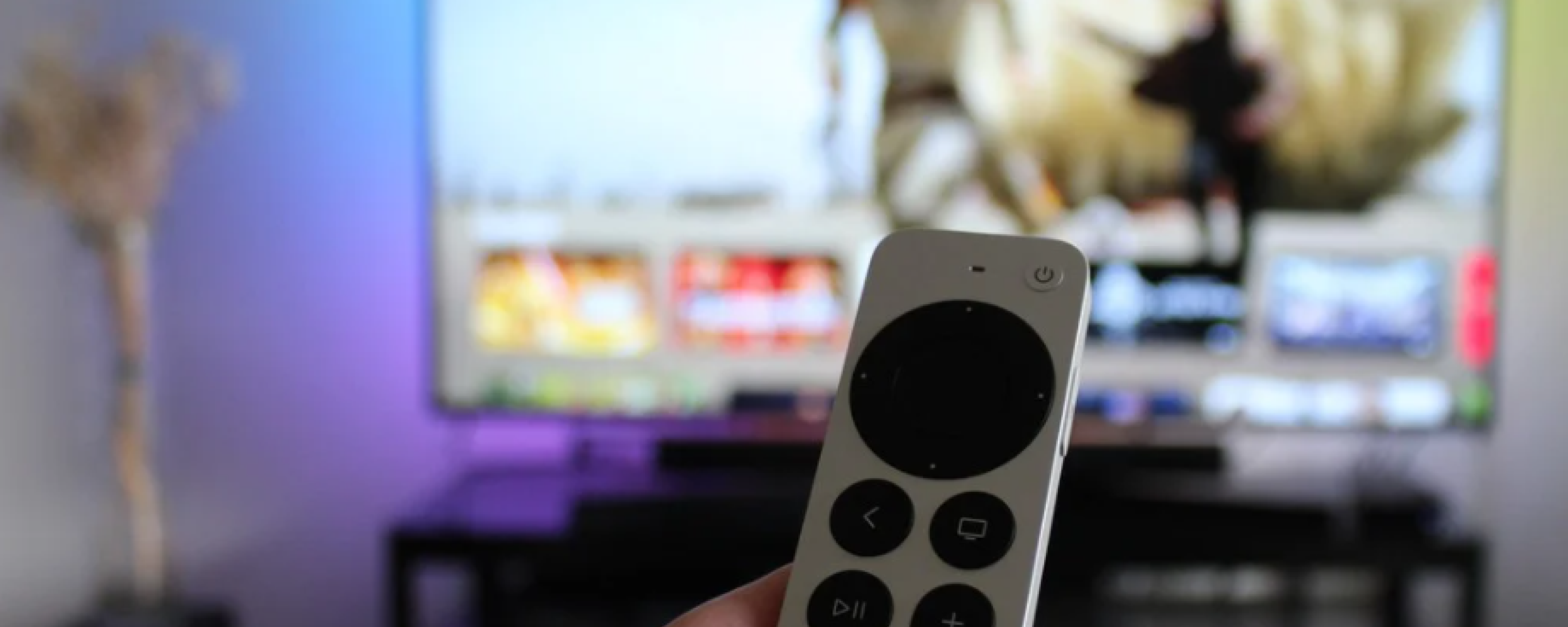
Yes, the 2021 Apple TV 4K is a clear upgrade over the 2017 model: it adds a redesigned click-pad Siri Remote, a faster A12 Bionic chip, HDMI 2.1 with eARC, Wi-Fi 6, and high frame rate HDR, and it still receives major tvOS updates while the 2017 model does not. Apple released that second-generation Apple TV 4K in April 2021, four years after the original 2017 model. In 2026, both devices have been discontinued, and the third-generation model launched in late 2022 (A15 Bionic) is the only new Apple TV Apple still sells. If you are choosing between a refurbished 2021 unit and a 2017 unit, or trying to decide whether the jump from 2017 to 2021 was ever worth it, this guide gives you the complete picture.
Table of contents
- Where both models stand today
- Apple TV 4K 2021 vs. 2017: full spec comparison
- The redesigned Siri Remote: the most meaningful upgrade
- Performance and everyday use
- Software support and tvOS in 2026
- Buying refurbished: what to know
- Should you upgrade from the 2017 to the 2021 model?
- Frequently asked questions
Where both models stand today
As of July 2026, Apple no longer sells either the 2017 or 2021 Apple TV 4K. The 2017 first-generation model was discontinued in April 2021 when the second generation launched. The 2021 second-generation model was itself discontinued in late 2022 with the arrival of the third-generation Apple TV 4K, which runs an A15 Bionic chip. That current model now starts at $199 for the 64GB Wi-Fi version and $249 for the 128GB Wi-Fi plus Ethernet version, up from its $129 and $149 launch prices after Apple raised Apple TV pricing in June 2026.
Both older models are available on the refurbished and secondary market. The 2017 model typically sells for around $45 to $60 used, while the 2021 model commands somewhat more given its newer processor and superior remote. According to RefurbMe's own tracking data, an Apple TV takes a median of 171 days to first appear refurbished after Apple releases it (RefurbMe Apple TV price index, as of June 2026), so refurbished stock of the newest model can lag its launch by several months. If you are shopping for an Apple TV today, read on to understand exactly what separates these two generations.
Apple TV 4K 2021 vs. 2017: full spec comparison
The external chassis of both models is identical. Both measure 1.4 inches tall by 3.9 inches wide and weigh 15 ounces. There is no visual way to tell them apart from the outside. The differences are entirely internal and in the remote.
Similarities
- Same physical design, dimensions, and weight
- 4K output at 2160p, 1080p, 720p, 576p, and 480p resolutions
- Audio up to 7.1.4 channels
- Dolby Atmos and Dolby Vision HDR
- HDR10 support
- HDMI-CEC
- Gigabit Ethernet port
- Bluetooth 5.0
- AirPlay 2
- HomeKit support
- Storage options of 32GB and 64GB
- Siri voice assistant
Differences
| Feature | Apple TV 4K 2021 (2nd gen) | Apple TV 4K 2017 (1st gen) |
|---|---|---|
| Processor | A12 Bionic, 2.49 GHz hexa-core | A10X Fusion, 2.38 GHz hexa-core |
| HDMI version | 2.1 (with eARC) | 2.0a (no eARC) |
| Wi-Fi | Wi-Fi 6 (802.11ax) | Wi-Fi 5 (802.11ac) |
| High frame rate HDR | Yes, up to 60fps | No |
| Thread networking | Yes | No |
| Color balance calibration | Yes, via iPhone | No |
| Siri Remote included | 2nd generation, click-pad design | 1st generation, glass trackpad |
| Remote charging | Lightning | Lightning |
| FaceTime support | Yes (tvOS 25 and later) | No |
The A12 Bionic in the 2021 model is a meaningful step up from the A10X Fusion. App launches are noticeably faster, interface animations are smoother, and demanding streaming tasks like high frame rate HDR playback are supported. The 2017 model does not support high frame rate HDR, meaning fast-moving sports or action content may not display as smoothly on compatible televisions.
The HDMI 2.1 upgrade also unlocks eARC (Enhanced Audio Return Channel). If you have a compatible soundbar or AV receiver, the 2021 model can route audio from other HDMI-connected devices through the Apple TV, something the 2017 model with its HDMI 2.0a port cannot do.
The redesigned Siri Remote: the most meaningful upgrade
For many owners, the remote is the single most important difference between these two generations.
The original Siri Remote bundled with the 2017 Apple TV 4K used a glass touch surface for navigation. It looked sleek, but in practice the slippery trackpad made basic tasks like scrolling through a list or scrubbing through a video frustrating. The remote was also nearly symmetrical, making it easy to pick up upside down in a dark room.
The second-generation Siri Remote that ships with the 2021 model replaced the trackpad with a physical click-pad and added dedicated mute and power buttons. A Siri button moved to the side of the remote. The overall shape is slightly thicker, making it easier to orient by touch. The result is a dramatically more intuitive device.
One important detail: you do not need a new Apple TV to get the new remote. Apple sold the second-generation Siri Remote separately for $59, and it is fully compatible with the 2017 Apple TV 4K. If the remote was your only complaint about the older device, replacing the remote alone is a cheaper path than buying a new unit. The third-generation Siri Remote (which ships with the 2022 model and uses USB-C instead of Lightning) is also compatible with older Apple TV 4K models running tvOS 15.4 or later.
Performance and everyday use
For basic 4K streaming from Netflix, Apple TV Plus, Disney Plus, or similar services, both the 2017 and 2021 models perform well. The A10X Fusion in the 2017 model is not slow by any means, and casual viewers are unlikely to notice a meaningful difference in day-to-day streaming performance.
Where the gap widens is in more demanding scenarios:
- High frame rate HDR content: The 2021 model supports HDR video at up to 60 frames per second. The 2017 model does not. If your TV supports HFR HDR and you watch a lot of sports or action content, this matters.
- Gaming and apps: The faster A12 Bionic handles heavier games and resource-intensive apps more smoothly.
- Audio routing via eARC: Useful for home theater setups with compatible receivers.
- Color balance calibration: The 2021 model can use a compatible iPhone to measure your TV screen and automatically calibrate the Apple TV's video output. The 2017 model has no equivalent feature.
One upgrade the 2021 model notably does not bring: HDR10+ support. That format arrived only with the 2022 third-generation model. For most users, Dolby Vision and HDR10 cover all available content, so this is a minor point, but worth knowing if HDR format support matters to you.
Software support and tvOS in 2026
The software support gap between these two models is no longer theoretical. At WWDC on June 8, 2026, Apple announced tvOS 27, which drops support for the 2017 first-generation Apple TV 4K (along with the 2015 Apple TV HD). The 2017 model stays on tvOS 26, its final major version, while the 2021 second-generation model and later remain supported and will receive tvOS 27 when it arrives in fall 2026.
The 2021 model, discontinued in late 2022, therefore has meaningful runway remaining. It is also worth noting that a new fourth-generation Apple TV 4K is expected in September 2026, which will reset the upgrade conversation once again.
Key tvOS features as of 2026:
- FaceTime: Available on the 2021 and later models, but not the 2017 first generation. This was introduced in tvOS 25.
- Multiview sports: Watch up to four live sports feeds simultaneously; available on all supported 4K models.
- Unified Apple TV app: The standalone iTunes Movies and TV Shows apps have been folded into the main Apple TV app across all supported devices.
If you are buying a refurbished device and plan to use it for several years, the 2021 model is the clear choice: it will keep receiving major tvOS updates, while the 2017 model has received its last one.
Buying refurbished: what to know
Both models are available through the refurbished and secondary market. Buying refurbished is a sensible way to get a capable Apple TV at a lower price, provided you understand what you are getting.
Certified refurbished Apple devices from Apple's own store come with a full one-year warranty, a fresh battery if applicable, and the same testing standards as new units. Third-party refurbishers on platforms like Back Market and Amazon Renewed offer further discounts with their own warranty terms. On RefurbMe, you can compare real-time pricing across these sellers to find the best deal.
A few things to consider when buying either model refurbished:
- Check which remote is included. Some listings for the 2017 model may include the original first-generation remote. If you want the improved click-pad remote, confirm it is part of the listing or budget for purchasing it separately.
- Storage size: The 32GB and 64GB variants exist for both models. For most users, 32GB is sufficient unless you download many large games.
- Condition grade: Refurbished grades (A, B, C) refer to cosmetic condition only. The internal hardware and software are fully functional regardless of grade.
Refurbished products are not the same as used products. A refurbished Apple TV has been tested, cleaned, and certified to function exactly as a new unit would. The only difference is cosmetic wear and the lower price.

2021 release
32GB storage
Should you upgrade from the 2017 to the 2021 model?
Here is the practical answer for each scenario:
You own a 2017 Apple TV 4K and it works fine. The calculus changed in June 2026: tvOS 27 drops the 2017 model, so it will not receive any further major software updates. Your device will keep working and streaming apps will continue to function for a while, and the streaming quality for most content remains identical. But if you want eARC, high frame rate HDR, FaceTime support, or continued OS updates, the 2021 model is now a meaningful step up. If the remote is your only complaint, buy the 2nd or 3rd generation Siri Remote separately.
You are buying an Apple TV for the first time. The refurbished 2021 model is a solid choice at a reduced price. If you want the latest hardware with the longest software support window, consider the 2022 third-generation Apple TV 4K instead, or wait for the anticipated 2026 model.
You have a high-end home theater setup. The HDMI 2.1 port and eARC capability of the 2021 model make a real difference if you have a compatible soundbar or AV receiver. The 2017 model does not support eARC at all.
You want FaceTime on your TV. This feature arrived in tvOS 25 and is only available on the 2021 and later models.
Frequently asked questions
Last updated: Jul 14, 2026 · First published: Jan 24, 2023


