

Apple Mail gained Apple Intelligence features with iOS 18 and refined them further in iOS 26, but it still lacks capabilities that third-party clients have offered for years. Meanwhile, Gmail entered what Google calls its "Gemini era," and Outlook added Copilot AI with voice commands. After testing dozens of alternatives, we selected the eight best iPhone email apps of 2026, each one strong enough to earn a permanent spot on your home screen. Whether you need AI-powered triage, end-to-end encryption, or deep calendar integration, this guide breaks down exactly which app fits your workflow. As of September 2026, iOS 27 (released on September 14, 2026) is the current iPhone release, so every recommendation below reflects the latest software available today.
Quick answer
The best iPhone email app in 2026 depends on your priority. Pick Microsoft Outlook for calendar integration and Copilot AI, Proton Mail for end-to-end encryption, Gmail for Gemini AI inside the Google ecosystem, and Apple Mail for free, on-device Apple Intelligence. For AI-driven team inboxes choose Spark Mail; for the best value with encryption, Canary Mail.
The best iPhone email apps at a glance
| App | Best for | Price | App Store rating |
|---|---|---|---|
| Microsoft Outlook | Calendar integration and Copilot AI | Free | 4.8/5 (9.1M+ ratings) |
| Proton Mail | Privacy and end-to-end encryption | Free; Plus from $4.99/mo | 4.8/5 (46K+ ratings) |
| Spark Mail | AI assistant and team collaboration | Free; Plus $99/yr | 4.6/5 (82K+ ratings) |
| Gmail | Gemini AI and Google ecosystem | Free | 4.7/5 (2.4M+ ratings) |
| Airmail | Workflow customization and power users | Free; Pro $39.99/yr | 4.2/5 |
| Canary Mail | AI-powered assistance with encryption | Free; Pro from $19.99/yr | 4.5/5 |
| Edison Mail | Automatic sorting and security alerts | Free; Mail+ $99.99/yr | 4.5/5 (78K+ ratings) |
| Apple Mail | Apple ecosystem and Apple Intelligence | Free | Built-in |
What makes an iPhone email app stand out?
A great email client does more than display messages. It actively reduces the time you spend in your inbox. Speed matters: the app should launch fast, sync in the background, and never leave you staring at a loading spinner. Beyond that, the best iPhone email apps share a handful of traits that separate them from the rest:
- AI-powered triage: summaries, smart replies, and priority sorting that surface what matters first.
- Multi-account support: seamless handling of Gmail, Outlook, iCloud, Yahoo, and custom IMAP accounts in one unified inbox.
- Clean, intuitive interface: easy navigation with customizable swipe gestures and quick actions.
- Advanced organization: folders, labels, categories, and automated rules that keep clutter at bay.
- Strong spam and phishing filters: protection that works without constant manual intervention.
- Calendar and productivity integration: direct access to scheduling, task managers, and cloud storage.
- Encryption and privacy controls: end-to-end encryption, tracking-pixel blocking, or on-device processing.
- Fair pricing: a generous free tier or a one-time purchase rather than costly monthly subscriptions.
- Cross-platform availability: consistent experience across iPhone, iPad, Mac, and other devices.
1. Microsoft Outlook
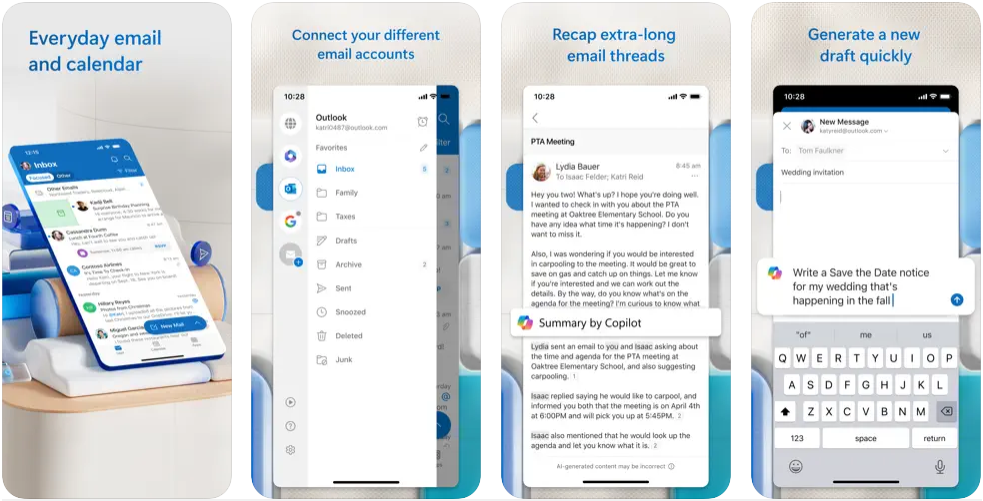
Best for: Professionals who need calendar integration, a focused inbox, and Copilot AI assistance.
Price: Free (no Microsoft subscription required)
App Store rating: 4.8/5 with over 9.1 million ratings.
✅ Pros:
- Focused Inbox separates important messages from promotional clutter automatically
- Copilot AI integration for voice-commanded email triage, drafting, and natural-language actions
- Built-in calendar with scheduling tools and file access via OneDrive
- Customizable swipe gestures for quick archive, delete, or flag actions
- Works with Gmail, Yahoo, iCloud, and other IMAP providers, not just Outlook accounts
❌ Cons:
- No support for POP3 email accounts
- Contact organization options are limited compared to desktop Outlook
Microsoft Outlook on iPhone has shed its reputation as a corporate-only tool. The mobile app is clean, fast, and surprisingly lightweight, a far cry from the feature-heavy desktop version. Its Focused Inbox uses machine learning to separate messages that matter from newsletters and promotions, and the integrated calendar makes it a strong all-in-one option for anyone managing a busy schedule.
The biggest recent addition is Copilot AI. As of January 2026, Outlook's mobile app supports an interactive voice experience that lets you summarize unread emails, draft replies, archive, pin, and flag messages entirely through voice commands. You can also highlight specific text in an email and ask Copilot to generate a response focused on that passage, or set up automatic replies using natural language prompts. These features make Outlook one of the most AI-capable free email clients available today.
2. Proton Mail
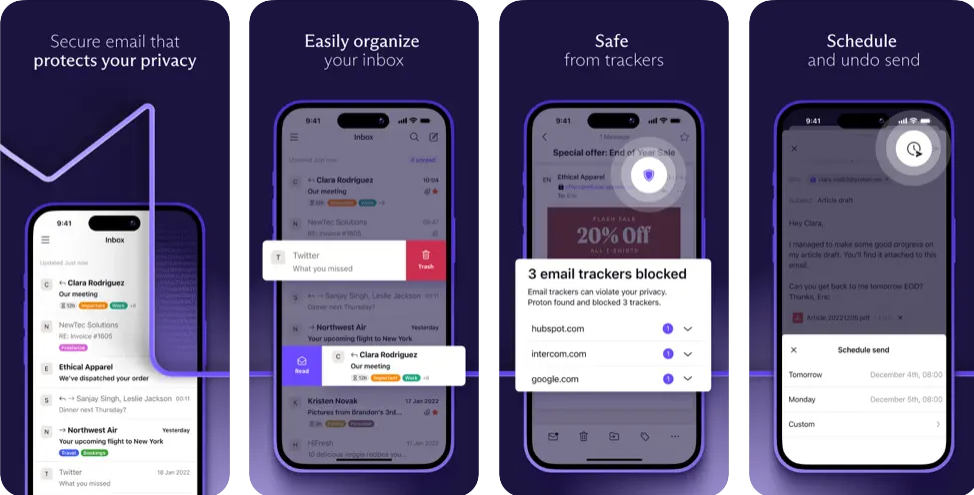
Best for: Privacy-focused users who want end-to-end encryption without sacrificing usability.
Price: Free plan available; Mail Plus starts at $4.99/month ($47.90/year). Unlimited plan at $14.99/month includes VPN, password manager, and 500 GB storage.
App Store rating: 4.8/5 with over 46,000 ratings.
✅ Pros:
- End-to-end encryption by default: even Proton’s own servers cannot read your messages
- Headquartered in Switzerland, subject to some of the world’s strongest privacy laws
- Self-destructing emails with customizable expiration timers
- Proton Scribe AI writing assistant for composing and refining messages
- No ads and no tracking: Proton’s revenue comes from subscriptions, not your data
❌ Cons:
- Free plan limits you to 1 GB storage and 150 messages per day; heavy users will need to upgrade
- Cannot integrate with third-party IMAP/SMTP clients on iOS
Proton Mail remains the gold standard for encrypted email on iPhone. Every message is protected with end-to-end encryption, and the service is governed by Swiss privacy legislation, meaning no government backdoors or advertising surveillance. The app underwent a significant redesign in 2025, introducing a true dark mode optimized for OLED screens and a dedicated Newsletters view that separates subscription emails from personal correspondence.
The addition of Proton Scribe, an AI writing assistant, marks a notable shift for a company that has historically been cautious about AI. Scribe helps compose and refine emails while maintaining Proton’s privacy-first approach. For anyone handling sensitive information, whether personal health records, financial data, or confidential business correspondence, Proton Mail offers peace of mind that no mainstream provider can match.
3. Spark Mail
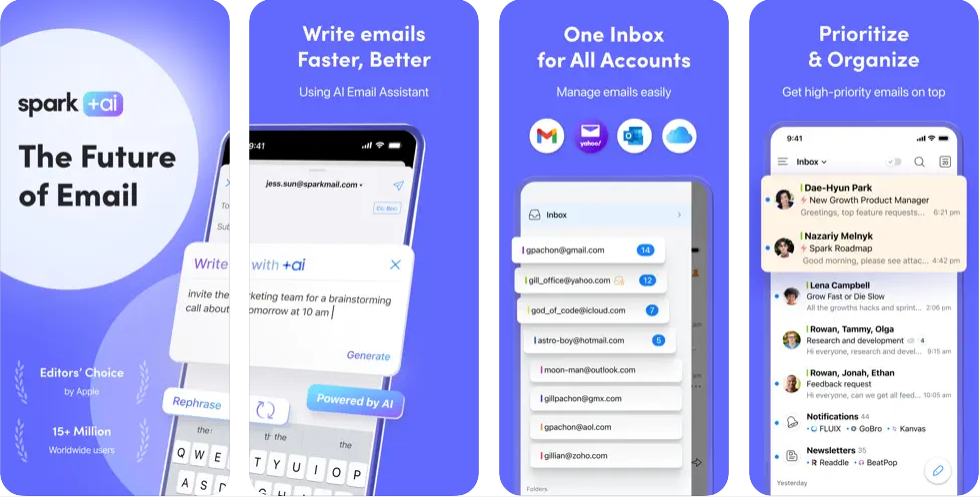
Best for: Professionals and teams who want an AI assistant baked into their email client.
Price: Free tier available; Spark Plus costs $99/year ($8.25/month). Spark Pro costs $199/year and adds shared inboxes, CRM integrations, and unlimited AI meeting notes.
App Store rating: 4.6/5 with over 82,000 ratings.
✅ Pros:
- Smart Inbox automatically categorizes messages into personal, notifications, and newsletters
- +AI suite composes replies, summarizes threads, adjusts tone, and generates meeting notes from Zoom calls
- Team collaboration features: shared drafts, internal comments, and delegated emails
- Integrated calendar view for quick scheduling without switching apps
- Available on iOS, Android, Mac, and Windows for a consistent cross-platform experience
❌ Cons:
- Pricing increased significantly; Plus now costs $99/year, up from earlier tiers
- The free tier limits AI usage and some organizational tools
Spark Mail, built by Readdle, has evolved from a clean inbox organizer into one of the most capable AI-driven email clients on iPhone. Its +AI suite handles the tedious parts of email: drafting replies, summarizing long threads, searching your archive using natural language, and even generating meeting notes from Zoom recordings. For teams, Spark’s collaboration tools allow shared inboxes, real-time co-writing of drafts, and internal comments directly on email threads, making it a viable alternative to dedicated tools like Slack for quick email-based coordination. The free version covers the basics well, but power users will want Plus or Pro for full AI access and team features.
4. Gmail
Best for: Users invested in the Google ecosystem who want Gemini-powered AI and tight integration with Drive, Calendar, and Meet.
Price: Free. Google Workspace plans start at $5.60/user/month for business features.
App Store rating: 4.7/5 with over 2.4 million ratings.
✅ Pros:
- Gemini AI Overviews synthesize entire email threads into concise summaries
- Natural-language inbox search lets you ask questions like "Who sent me the invoice last month?"
- Help Me Write drafts and polishes emails; Suggested Replies match your personal writing style
- Seamless integration with Google Drive, Google Calendar, and Google Meet
- 15 GB of free storage shared across Google services
❌ Cons:
- Advanced AI features like Proofread and inbox questions require a Google AI Pro subscription
- Privacy-conscious users may be uncomfortable with Google's data practices
Gmail entered what Google officially calls its "Gemini era" in January 2026, and the upgrade is substantial. AI Overviews now synthesize entire email conversations into concise summaries of key points, eliminating the need to read through lengthy threads. You can ask your inbox questions in natural language, such as "Who was the plumber that gave me a quote last year?", and receive AI-generated answers drawn from your email history. Help Me Write drafts emails from scratch or polishes existing compositions, while the updated Suggested Replies analyze conversation context to generate one-click responses that match your writing style.
Gmail powers over 1.8 billion accounts worldwide, and on iPhone the app delivers the full Google experience: tabbed inboxes, instant access to Drive attachments, and search powered by Google's indexing technology. If your workflow already revolves around Google services, the Gmail app keeps everything in one place.
5. Airmail

Best for: Power users who want deep customization, automation, and integration with third-party services.
Price: Free with basic features (single mailbox); Airmail Pro costs $7.99/month or $39.99/year for multiple mailboxes.
App Store rating: 4.2/5.
✅ Pros:
- Custom actions let you build automated workflows for repetitive email tasks
- Deep integrations with Todoist, Trello, Asana, Google Drive, Dropbox, and more
- Editable smart folders with search integration for fine-grained inbox control
- Turns emails into actionable to-do items with a single tap
- Designed specifically for Apple platforms: iOS, macOS, and watchOS
❌ Cons:
- Pro subscription increased from $9.99/year to $39.99/year, a significant price jump
- The sheer number of customization options creates a steep learning curve
Airmail is the email client for people who treat their inbox like a command center. Its custom actions system lets you chain together multi-step workflows: forward to a project manager, add a task to Todoist, and archive the message, all with one swipe. The app earned an Apple Design Award for good reason: it looks and feels native to iOS while packing more power than most desktop clients. Recent updates brought editable smart folders and compatibility with iOS 26's Liquid Glass design language.
One caveat: Airmail's pricing has changed significantly. The Pro subscription jumped from $9.99/year to $39.99/year, which may prompt some users to reevaluate. The free tier now includes all essential features for a single mailbox, but managing multiple accounts requires Pro. The trade-off is complexity; casual users may find the options overwhelming, but anyone who takes the time to configure Airmail will be rewarded with a highly personalized email experience.
6. Canary Mail
Best for: Users who want AI assistance and end-to-end encryption in the same app.
Price: Free with basic features; Canary Pro starts at $19.99/year. Growth plan at $35.99/year adds advanced AI and team features.
App Store rating: 4.5/5.
✅ Pros:
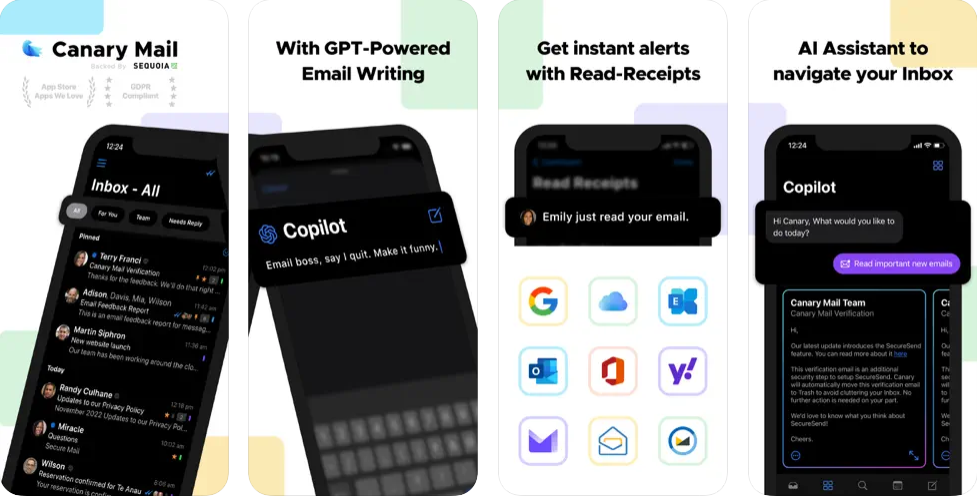
- Copilot AI drafts replies, summarizes threads, and lets you ask questions about email content
- End-to-end encryption using PGP and SecureSend for recipients without PGP keys
- Focus Inbox uses machine learning to surface priority emails automatically
- One-click unsubscribe and impersonation detection for added security
- Biometric app lock and read receipt tracking included in the free tier
❌ Cons:
- AI capabilities, while improving, still lag behind Spark and Superhuman
- Encryption setup requires some technical knowledge for first-time users
Canary Mail occupies a unique niche: it combines AI-powered inbox management with genuine encryption, a pairing most competitors force you to choose between. The Copilot AI handles everyday tasks, drafting quick replies, summarizing long threads, and flagging messages that need attention, while PGP encryption ensures that sensitive conversations stay private. At $19.99/year for the base Pro plan, Canary is one of the most affordable premium email clients available, making it particularly compelling for individual professionals who want AI and privacy without Spark's higher price tag. The app works across iOS, macOS, Android, and Windows, making it a solid choice for users who switch between devices and want consistent privacy protections everywhere.
7. Edison Mail
Best for: Shoppers and travelers who want automatic sorting, package tracking, and AI-powered security.
Price: Free; Edison Mail+ costs $14.99/month or $99.99/year and adds four-level phishing protection, Inbox Caller ID, and LinkedIn Discovery.
App Store rating: 4.5/5 with over 78,000 ratings. Named the number-one independent mail app on the App Store.
✅ Pros:
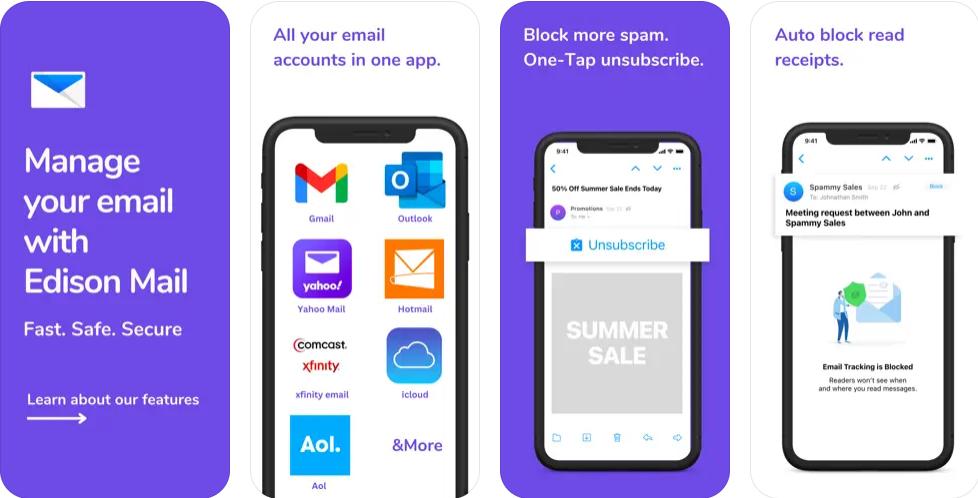
- AI-powered assistant automatically categorizes messages into subscriptions, purchases, travel, and more
- Blocks over 8,600 tracking pixels per year by default, protecting your privacy without configuration
- AI Compose feature drafts and refines emails directly on mobile
- Mail Rules automate actions based on custom criteria for hands-off inbox management
- Price Alert monitors purchases and notifies you of price drops for potential refunds
❌ Cons:
- Smart notifications can be inconsistent, occasionally missing important messages
- Mail+ at $99.99/year is among the pricier premium tiers on this list
Edison Mail is built for people whose inbox doubles as a shopping dashboard, travel planner, and security checkpoint. The app scans incoming messages and automatically organizes them by category: receipts, shipping confirmations, flight itineraries, and subscription notices all land in their own views. The recently added Mail Rules feature lets you create automated workflows based on sender, subject, or other criteria, bringing a level of customization previously reserved for desktop clients.
Edison Mail+ focuses heavily on security. Its four-level phishing scanner validates whether emails are authentic before you interact with them, while Inbox Caller ID identifies unknown callers based on contact details found in your email. The app also blocks tracking pixels by default, meaning senders cannot tell when or whether you opened their message. For hands-off inbox management paired with genuine security features, few apps match Edison's convenience.
8. Apple Mail
Best for: iPhone users who want a capable, no-install email client with Apple Intelligence features built in.
Price: Free (pre-installed on every iPhone).
✅ Pros:
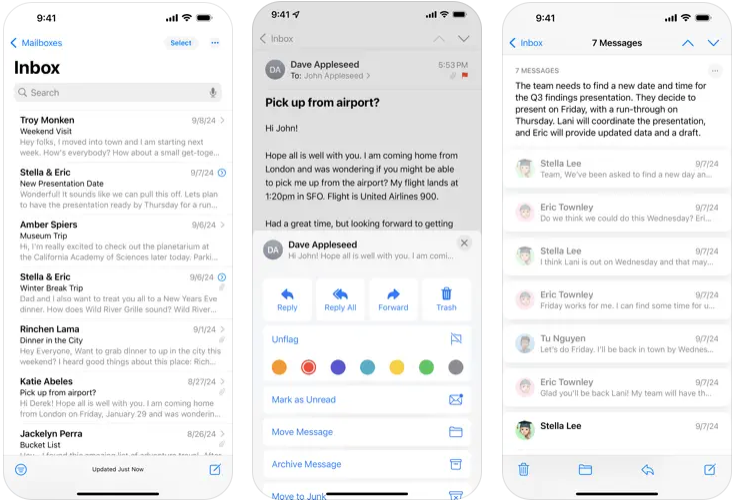
- Apple Intelligence integration: AI-generated summaries in notification previews and pre-headers
- Categorized inbox tabs (Primary, Transactions, Updates, Promotions) mirror Gmail’s tabbed approach
- Priority messages pinned at the top based on relevance and urgency
- Smart Reply suggestions powered by on-device machine learning
- Mail Privacy Protection blocks tracking pixels; all AI processing happens on-device
- VIP filters, thread notifications, and compatibility with Gmail, Outlook, Yahoo, and IMAP accounts
❌ Cons:
- Apple Intelligence features require an iPhone 15 Pro or later
- Still lacks team collaboration, advanced automation, and deep third-party integrations
- Some users reported slower mail fetching in early iOS 26 builds, though subsequent updates resolved the issue
Apple Mail introduced Apple Intelligence features in iOS 18 and has continued refining them through iOS 26. AI-generated summaries appear directly in notification banners, saving you from opening every message to gauge its importance. The categorized tabs, Primary, Transactions, Updates, and Promotions, automatically sort incoming mail in a way that will feel familiar to Gmail users. Priority messages float to the top of your inbox based on context and urgency, and Smart Reply suggestions help you respond faster.
What sets Apple Mail apart from every competitor on this list is its privacy model. All AI processing happens on-device, meaning Apple never sees the content of your messages. Mail Privacy Protection blocks tracking pixels by default, preventing senders from knowing when you opened their email. For users already deep in the Apple ecosystem, the updated Mail app may finally be good enough to skip third-party alternatives altogether.
Conclusion
The right email app depends on what you value most. For raw privacy, Proton Mail is unmatched. For AI-powered productivity, Gmail’s Gemini features and Outlook’s Copilot now lead the pack, with Spark Mail close behind. Apple Mail offers the strongest on-device privacy model of any client on this list. Power users will gravitate toward Airmail’s customization, Canary Mail delivers the best value for individual professionals, and Edison Mail is hard to beat for automated shopping tracking and phishing protection.
The good news: every app on this list offers a free tier or comes pre-installed, so you can test several before committing. Most support multiple email accounts, meaning you do not have to abandon your current provider to try something new.
Bottom line: for most iPhone owners in 2026, Microsoft Outlook is the best all-around pick, combining free Copilot AI, a Focused Inbox, and a built-in calendar in one app. Choose Proton Mail if privacy is your priority, and stick with Apple Mail if you want a capable, no-install client that keeps every AI feature on-device.
Learn more: 20 best AI apps for your iPhone | How long does Apple support iPhones?
Looking to pair your new favorite email app with a reliable iPhone? Explore refurbished options on RefurbMe. You can find high-quality iPhones at a fraction of the retail price, all backed by a warranty for added peace of mind. Compare models, conditions, and prices across multiple refurbishers:

64GB storage
Black
64GB storage
Black
FAQ
Last updated: Sep 15, 2026 · First published: Feb 24, 2025