
- Refurbished
- MacBook
- MacBook Pro
- 13 inch
- MUHN2-124

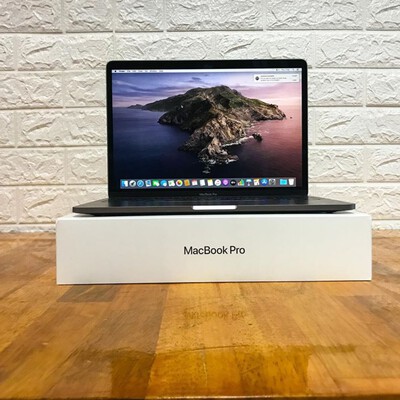
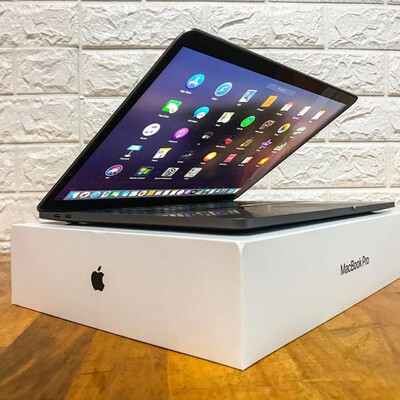
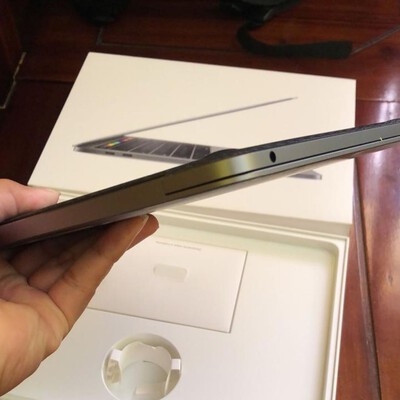
Refurbished MacBook Pro 13.3"
128GB SSD, 1.7Ghz Intel Quad-Core i7 8th gen, 8GB memory • Space Gray, with Touch Bar • 2019 release
Not available at the moment
We can alert you when it's in stock

At the moment, no product is available matching:
Questions & Answers
Every refurbished MacBook comes with the keyboard layout standard in the region where it was originally sold. You cannot request a different physical keyboard layout from a refurbisher because the keys are built into the laptop chassis.
Common keyboard layouts by regionThe layout you receive depends on the market the MacBook was sourced from:
- US and Canada use the QWERTY (ANSI) layout
- UK uses the QWERTY (ISO) layout, which has a different Enter key shape and a few symbol changes
- France uses the AZERTY layout
- Germany uses the QWERTZ layout
- Spain and Italy use QWERTY (ISO) variants with region-specific accent keys
Most refurbishers sell MacBooks with the keyboard layout matching their local market. If a specific layout matters to you, verify with the seller before purchasing.
Software keyboard changesWhile you cannot change the physical keys, macOS lets you add and switch between input sources in System Settings > Keyboard > Input Sources:
- Type in a different language without matching physical keys
- Remap specific keys using built-in macOS settings
- Switch between multiple input languages with a keyboard shortcut
If you prefer a different physical layout, an external keyboard is a practical solution:
- Apple's Magic Keyboard is available in nearly every regional layout
- Third-party mechanical keyboards offer even more layout options
- You can close the MacBook lid and use it with an external display and keyboard for a desktop-like setup
For more details on what ships in the box, see what accessories are included with a refurbished MacBook.
Yes, refurbished MacBooks have their operating system completely reinstalled during the refurbishment process. The internal storage is erased and a fresh copy of macOS is loaded, so the MacBook arrives ready to use just like a new one.
The reinstallation processEvery certified refurbisher follows a similar workflow:
- The MacBook's internal drive is securely wiped, removing all data and the previous operating system
- A clean copy of macOS is installed from scratch
- The MacBook is booted to the Setup Assistant screen, confirming the OS is freshly installed and no previous user accounts remain
This process ensures the MacBook is free of any leftover files, settings, or software from its previous owner. For more on data security, see do refurbished Apple products have user data on them.
What macOS version gets installedThe version of macOS installed varies by refurbisher:
- Apple Certified Refurbished typically installs the latest compatible macOS
- Third-party refurbishers (Back Market, Amazon Renewed, and others) usually install the latest compatible version, but some may ship with an older version
- At minimum, the MacBook will have its default macOS, the version it originally shipped with
You can check the default and maximum supported macOS for any MacBook on RefurbMe. For details, see what version of macOS do MacBooks come with.
How to update after purchaseIf your refurbished MacBook arrives with an older macOS version, updating is free and straightforward:
Keeping macOS up to date ensures you get the newest security patches, features, and app compatibility. For a broader view of refurbished MacBooks, read about the pros and cons of buying one.
Start with what you will actually do on the laptop, then match the specs to it. For most people, a MacBook Air with an Apple Silicon chip, 16 GB of memory, and 256 to 512 GB of storage is plenty. Choose a MacBook Pro only if you edit video, compile code, or run heavy apps for hours. Then pick a condition grade and compare prices.
MacBook Air or MacBook Pro?The Air is fanless, lighter, and cheaper, and it handles browsing, office work, coding, and light photo editing comfortably. The Pro adds a brighter display, more ports, active cooling, and higher-end chips for sustained heavy work.
If you are unsure, the Air is the safer default. Most buyers who reach for a Pro to "future-proof" never use the extra headroom.
Which chip generation should you get?Any Apple Silicon chip (M1 and newer) is a big step up from the old Intel MacBooks and stays fast for years. A newer generation mainly buys better battery life and graphics, not a night-and-day change in everyday speed.
Buying one or two generations back is usually where the best refurbished value sits.
How much RAM and storage do you need?For memory, 16 GB is the comfortable baseline today; 8 GB still works for light use but leaves less room to grow. For storage, 256 GB suits cloud-first users, while 512 GB or more fits large local libraries.
Neither memory nor storage can be upgraded later on Apple Silicon Macs, so choose both with a little headroom.
Does the condition grade matter?Cosmetic grade affects price, not function. A Grade B or C MacBook shows more visible wear but is tested and warrantied the same as Grade A. If you use a case or do not mind minor marks, a lower grade stretches your budget. See refurbished cosmetic conditions explained.
For model picks, read the best refurbished MacBooks guide.
A refurbished MacBook typically comes with only the essential accessories needed to charge and use the laptop. The exact contents vary depending on the refurbisher and the MacBook model.
What Apple Certified Refurbished includesApple's own refurbished store provides the most complete package:
- The appropriate power adapter (wattage matched to the model)
- A charging cable (USB-C or MagSafe, depending on the model year)
- All items in new packaging with Apple branding
Back Market, Amazon Renewed, and other third-party sellers typically include:
- A power adapter (may be a third-party charger rather than Apple-branded)
- A charging cable
You can compare the included accessories between certified refurbishers here.
MagSafe vs USB-C chargersThe charger you receive depends on your MacBook's model year:
- MacBook Air and Pro (2015-2017) use MagSafe 2 connectors
- MacBook Air and Pro (2018-2021) use USB-C charging
- MacBook Pro 14" and 16" (2021+) and MacBook Air (2022+) support both MagSafe 3 and USB-C charging
Make sure the included charger matches your model. If in doubt, check the product listing or contact the seller.
What you may need to buy separatelyRefurbished MacBooks do not typically include extras beyond the charger. You may want to purchase:
- USB-C adapters or hubs for connecting external displays, USB-A devices, or SD cards
- A carrying case or sleeve for protection
- An external keyboard or mouse if you plan to use the MacBook in a desktop setup
Our guide to the best MacBook accessories covers the hubs, cases, and peripherals worth adding.
For details on keyboard layout options, see can I have a different keyboard on a refurbished MacBook.
Refurbished MacBooks come with the same software bundle that is pre-installed on new MacBooks. The operating system is reinstalled during refurbishment, and all of Apple's built-in apps are included.
Default apps includedEvery refurbished MacBook ships with Apple's standard suite of built-in applications:
- Safari for web browsing
- Apple Music (formerly iTunes) for music and podcasts
- Photos (formerly iPhoto) for photo and video management
- iMovie for video editing
- GarageBand for music creation
- Pages, Numbers, and Keynote for productivity
- FaceTime and Messages for communication These apps come free with macOS and are automatically available after setup.
The version of macOS installed determines which apps and features you get. Most refurbishers install the latest compatible macOS, but this can vary. Check what version of macOS MacBooks come with for details on default and maximum supported versions.
Can you install your own software?Yes. A refurbished MacBook works exactly like a new one, so you can install any software you want:
- Download apps from the Mac App Store using your Apple ID
- Install third-party apps from developer websites
- Use package managers like Homebrew for developer tools
For inspiration on what to add first, see our roundup of the best Mac apps to install.
There are no restrictions on software installation. If your MacBook supports the macOS version required by an app, it will run without issues.
Refurbished MacBooks are pre-owned laptops that have been professionally restored to full working condition. They come from several sources before reaching the refurbisher's testing and repair process.
Where refurbished MacBooks originate- Customer returns. The largest source. Buyers return MacBooks within the return window for various reasons, from minor dissatisfaction to ordering the wrong configuration.
- Trade-ins. Users trade in their old MacBook when upgrading. Apple and third-party sellers accept trade-ins and refurbish the devices for resale.
- Display models. Store floor demo units are retired and sent for refurbishment after a product cycle ends.
- Overstock. Excess inventory from retailers or distributors that never sold as new.
- Warranty replacements. Devices returned under warranty with minor defects that are repaired and resold.
Once a MacBook enters the refurbishment pipeline, it goes through:
All MacBooks listed on RefurbMe are sold by professional refurbishers. You can compare sellers to find the best combination of price, warranty, and cosmetic condition.
For the full picture on buying refurbished Apple products, read these 9 facts you need to know before buying a refurbished Apple product.